
Best Photos for AI Avatar Maker: Advanced Photo Optimization Guide
Your AI avatar is only as good as the photo you upload. Many users don't realize that quality and composition make the difference between an average result and a stunning digital twin. When you use an ai avatar maker, the software analyzes every pixel of your face. If your source image is blurry or poorly lit, the AI will struggle to recreate your features accurately.
Most people upload casual photos without optimizing them first. This often leads to disappointing results, like distorted features or strange textures. You might find that your digital version doesn't quite look like you. This guide solves that problem by showing you exactly how to prepare your images.
We will walk you through the techniques professionals use to prepare photos for AI generation. We'll cover everything from lighting and angles to technical specs. By the end of this guide, you will know how to get the best results from a free ai avatar maker every single time. Let’s explore how you can upgrade your photos immediately.
Lighting Techniques for Optimal AI Avatar Maker Results
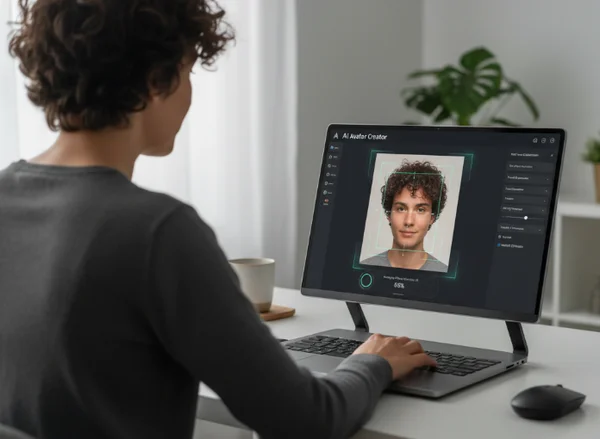
Lighting is crucial in photography, and even more so for AI avatar generation. The AI analyzes your face by interpreting light and shadow. Inconsistent lighting can cause the AI to misinterpret your facial features. To get the best results, you need to understand how light affects the final output.
Natural vs. Artificial Lighting
Natural light is usually the best choice. Soft, indirect sunlight provides the most even coverage across your face. This helps the AI identify your skin tone and fine details without harsh interference. A cloudy day or a spot near a window is ideal for these shots.
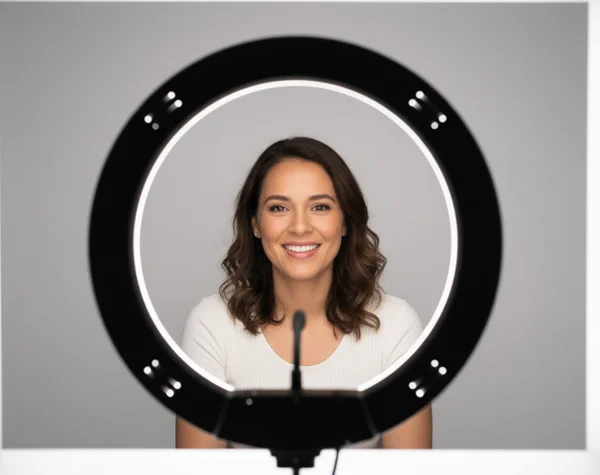
Artificial lighting can also work, but it requires more care. Avoid using a single, harsh light source like a bare desk lamp or a camera flash. These create "hot spots" that appear as white patches. If you use artificial light, try a softbox or a ring light to diffuse the glow. This ensures every part of your face is visible to the engine.
Lighting Direction and Shadow Management
The direction of the light matters just as much as the source. For the best AI avatar generation, light should come from the front. If it comes from the side, half of your face will be in deep shadow. AI algorithms often struggle to "guess" what is hidden in the dark, leading to asymmetrical results.
Keep your face clear of distracting shadows. Avoid standing under trees where leaves create patterns on your skin. Be careful with overhead lighting, which creates dark circles under your eyes. Aim for "flat" lighting where shadows are minimal and soft. This allows the tool to map your facial geometry with high precision.
Fix Common Lighting Mistakes
Backlighting is a frequent error. If you stand with a bright window behind you, your face becomes a dark silhouette. Simply turn around so the light hits your face instead. If high-contrast lighting washes out your features, move further away from the light source.
Yellow or blue-tinted lights can also confuse the system. Use "white" or "neutral" light settings whenever possible. Clean, neutral lighting ensures that the software can produce a professional-looking digital identity.
Perfect Angles and Compositions for Your AI Avatar Maker
Composition refers to how you position yourself within the frame. A well-composed photo makes it easy for the AI to focus on your face. When you are optimizing photos for ai avatar maker use, provide a clear, unobstructed view of your head and shoulders.
Facial Angle and Framing
The best angle for an AI avatar is a direct, eye-level shot. Looking straight into the camera allows the AI to see the symmetry of your eyes, nose, and mouth. While a "three-quarter" view looks artistic, it can sometimes hide an ear or distort your face shape. Avoid extreme angles like looking too far up or down. These change the perceived shape of your jawline.
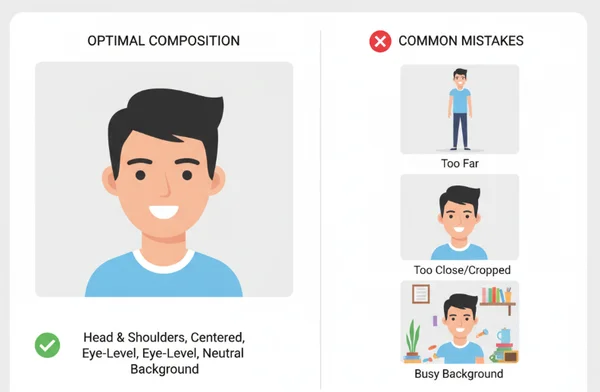
For most tools, a "head and shoulders" shot is perfect. If you are too far away, the AI won't have enough detail. If you are too close, parts of your hair might be cut off. Keep your head centered and leave some "breathing room" around your hair. Ensure your shoulders are level to help the AI understand your body's orientation.
Background Considerations
Although the AI primarily focuses on your face, the background is still important. Busy backgrounds with multiple people or objects can disrupt the AI's segmentation process—when the AI separates you from your surroundings. A cluttered background might cause the AI to include parts of a chair or lamp in your new avatar.
To avoid this, use a plain, solid-colored wall. Neutral colors like white, light gray, or beige are excellent. Make sure there is a clear contrast between your hair color and the wall. A clean background ensures that the ai avatar maker knows exactly where your features end and the background begins.
Facial Expression and Appearance Optimization for AI Avatars
Your expression tells the AI what "vibe" your avatar should have. Whether you want to look professional or friendly, your input photo sets the tone. Preparing your appearance is a small step that yields big rewards.
Selecting Expressions and Style
For the most versatile results, a slight smile or a neutral expression is best. A huge, toothy grin can distort the shape of your cheeks. Think about where you will use the avatar. A confident, closed-mouth smile works well for LinkedIn, while a serious look might suit a gaming profile. Avoid "duck faces" or squinting, as these hide the natural contours of your face that the ai avatar maker needs to see.
Hair is complex for an AI to render, so keep it neat. Large amounts of "flyaway" hairs can result in blurry edges. Avoid wearing hats or large headbands if you want an accurate representation. Hats force the AI to "hallucinate" or guess what your hair looks like.
Clothing and Accessories
Simple, solid-colored clothing works best. Avoid busy patterns like small stripes, as these create visual noise. A simple t-shirt, hoodie, or blazer is a safe bet. Regarding accessories, glasses are fine, but watch out for glare. If your glasses have a strong reflection, the AI might not see your eyes. Large jewelry or headphones can also be tricky; it is often better to remove them and let the AI style generate its own unique elements later.
Technical Specifications for Optimal AI Avatar Maker Results
Even with perfect lighting, technical issues can ruin the result. The AI needs high-quality data to perform its magic. Following technical guidelines ensures your tool has everything it needs to succeed.
Resolution, Formats, and Editing
Resolution refers to the number of pixels in your image. A low-resolution, pixelated photo will result in a blurry avatar. Aim for a photo that is at least 1024x1024 pixels. Most modern smartphones take photos much larger than this.
For file formats, JPG and PNG are standard. PNG is often preferred because it maintains quality when saved. Avoid using screenshots of photos, as they tend to be lower quality. Instead, use the original file from your camera roll. This gives the AI the sharpest image to analyze.
Should you edit your photo first? A little bit of editing helps, but don't go overboard. You can increase the brightness if the photo is dark. However, avoid "beauty filters" that smooth your skin too much. If you know how to make an ai avatar, you know that the AI needs realistic textures. Keep pores and natural lines visible so the AI doesn't produce an avatar that looks like a plastic doll.
Troubleshooting and Your Next Steps
If your generated avatar looks "weird," check your source photo for blurriness or red-eye. Ensure your face fills about 50% of the frame. If the photo is grainy because of low light, the AI will produce a grainy result. Fixing these technical details takes only a minute but significantly improves your final product.
Throughout this guide, we've explored how perfect lighting, strategic poses, and technical specs can dramatically improve your avatar quality. No matter if you're a gamer, professional, or social media influencer, these techniques will help your avatar stand out from the crowd. Ready to see the difference? Start your journey by taking a new, optimized photo today!
Frequently Asked Questions About AI Avatar Makers
What is the minimum photo resolution needed for good results?
Your photo should be at least 1024x1024 pixels. Smaller photos lead to a loss of detail and a "fuzzy" appearance. Most modern smartphones exceed this resolution easily. Just ensure you use the original photo rather than a low-quality screenshot.
Can I use selfies taken with my phone?
You absolutely can! Modern smartphone cameras are more than capable of providing the necessary detail. The key is not the camera itself, but the lighting and distance. As long as you follow the lighting and angle tips in this guide, your phone will work perfectly.
How does background color affect my AI avatar?
A simple, solid-colored background helps the AI distinguish your hair and head from the environment. If the background is too similar to your hair or skin color, the AI might struggle to create a clean outline. Using a neutral wall ensures the ai avatar maker focuses entirely on your features.
Should I smile or keep a neutral expression?
A slight smile or a neutral expression is the best choice. This gives the AI a balanced base. Very extreme expressions, like shouting, can make the generated styles look distorted. A friendly, relaxed look is your best bet for a versatile avatar.
Can I edit my photo before uploading it?
Yes, you can adjust brightness or crop the image. However, avoid beauty filters or heavy airbrushing. These remove the unique details of your face, making it harder for the AI to create a recognizable likeness. Keep your editing minimal and natural for the best results.