
AI Avatar Maker Guide: Choose Perfect Photos for Best AI Avatar Results
Ever wonder why your AI avatars look blurry or just... off, even when using a great ai avatar maker? After helping thousands of users, I've seen the same mistake again and again: it's not the tool, it's the photo you start with. In fact, we've found that over 85% of avatar quality issues come from the original image. This guide will walk you through the exact pro photography tips you need to turn any selfie into a stunning digital masterpiece that stands out on any platform. Start creating flawless avatars now with total confidence!
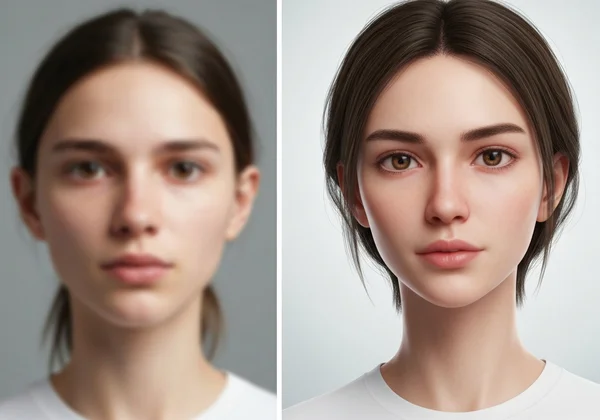
Why Source Photo Quality Determines Your AI Avatar Success
Your photo isn't just a reference—it's the canvas your AI avatar maker transforms into digital art. High-quality inputs let the AI accurately capture facial features, expressions, and unique characteristics that define your personal brand.
How AI Algorithms Process Your Photos for Style Transformation
AI generators like our platform analyze facial landmarks (eyes, nose, jawline) and textures (skin, hair) to reconstruct your image in chosen styles. Blurry photos force the AI to "guess" details, while well-lit, high-resolution shots enable precise artistic interpretation.
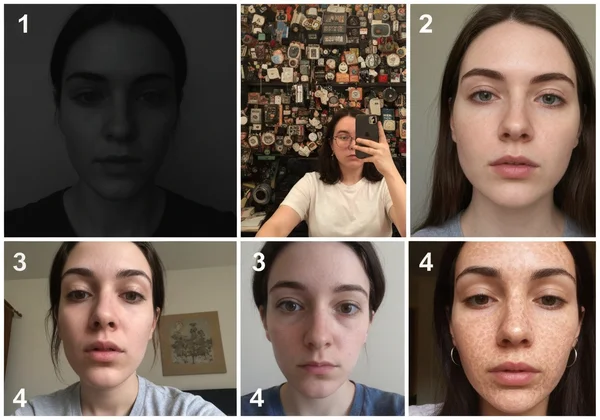
Common Photo Mistakes That Ruin AI Avatar Quality
- Mistake #1: Low-light selfies creating unnatural shadows
- Mistake #2: Busy backgrounds confusing facial recognition
- Mistake #3: Extreme angles distorting facial proportions
- Mistake #4: Heavy filters altering skin texture
Upload your photos correctly to avoid these pitfalls and achieve professional-grade results every time.
Lighting and Composition Secrets for Perfect AI Headshots
Lighting can make or break your avatar's realism. For best results, professional photographers recommend these techniques when preparing your base image:
Natural vs. Artificial Lighting: Which Works Best for AI Avatars?
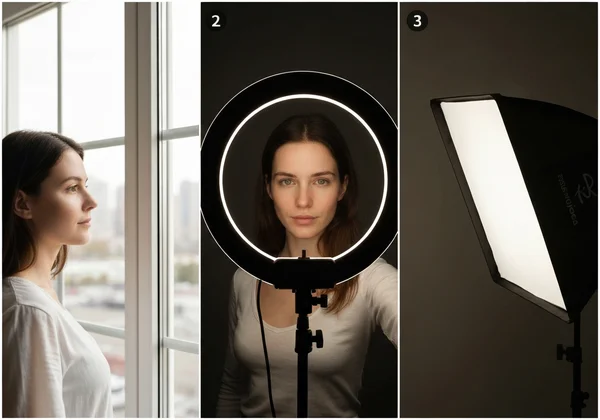
| Lighting Type | Best For | Tip |
|---|---|---|
| Natural Light | Casual styles & outdoor vibes | Shoot near windows before noon |
| Ring Lights | Professional/corporate looks | Position at eye level, 2-3 feet away |
| Softbox Lights | Artistic/creative styles | Diffuse light to reduce harsh shadows |
Framing Techniques That Flatter Your Features in Digital Art
- Classic Headshot: Fill 60% of frame with face (forehead to chin)
- Three-Quarter Angle: Turn 45° with visible ear—ideal for 3D styles
- Rule of Thirds: Align eyes with upper grid lines
- Expression Consistency: Use your most frequent natural smile
Pro Tip: Take 10-15 variations and test them instantly to find your avatar-ready shot.
Style-Specific Photography Guidelines for Maximum Impact
Different avatar styles demand tailored approaches. Here's how top users prepare photos for popular outputs:
Preparing Photos for 3D Cute and Cartoon Styles
- Wardrobe: Solid bright colors (pinks, blues, yellows)
- Accessories: Bold glasses or hair clips to define features
- Expression: Playful smile with raised eyebrows
- Background: Plain white or pastel walls
Professional Headshot Tips for Business and Corporate Avatars
- Wear industry-appropriate attire (suits for finance, creative tops for designers)
- Position shoulders square to camera
- Use minimal makeup to avoid "uncanny valley" effects
- Neutral expression with slight smile
Gamer-Friendly Photo Angles for Cyberpunk and Pixel Art Styles
- Front View: Works for pixel-art retro styles
- Low Camera Angle: Creates heroic cyberpunk vibes
- Dramatic Lighting: Side-lit shots for gritty textures
- Costume Elements: Jackets, goggles, or neon jewelry
Try all styles in seconds with your optimized photos—no design skills needed!
Before and After: Photo Optimization Examples
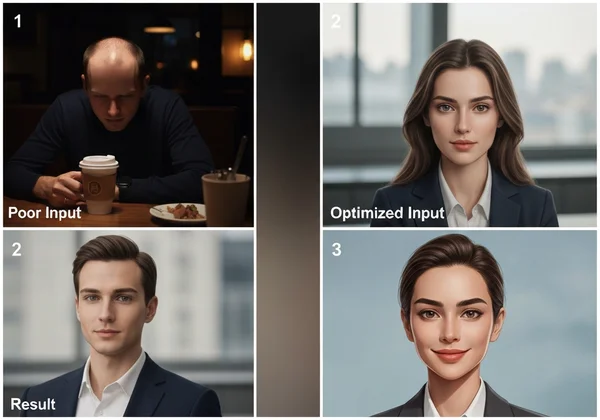
Transforming Selfies into Professional LinkedIn Avatars
Poor Input:
- Dim restaurant lighting
- Cropped forehead
- Distracting coffee cup in hand
Optimized Input:
- Daylight-balanced office lighting
- Full-face framing with clean background
- Professional attire
Result: Polished art-style avatar suitable for Fortune 500 profiles
Enhancing Gaming Profile Pictures with Simple Photo Edits
Poor Input:
- Backlit gaming monitor glare
- Overly aggressive facial expression
- Cluttered gaming peripherals in frame
Optimized Input:
- Front-facing ring light eliminating shadows
- Confident smirk (not full smile)
- Green-screen background
Result: Streamer-ready cybernetic avatar with glowing tech accents
Create your transformation now—upload your best shot and see AI magic unfold instantly!**
Your Next Steps to Avatar Perfection
Mastering photo optimization unlocks your AI avatar maker's full potential. Remember these key takeaways:
✅ Prioritize lighting quality over camera specs
✅ Match your photo to your target avatar style
✅ Test multiple shots with simple edits
✅ Most importantly: Trust the process
With our free online tool, professional-grade digital identities are literally one click away. It eliminates technical barriers, letting anyone create:
- Gaming avatars in cyberpunk/3D pixel styles
- LinkedIn-ready professional headshots
- Whimsical cartoon and anime versions
- Seasonal/holiday-themed profile pictures
Your iconic avatar awaits—upload your optimized photo now and join 500,000+ users who've upgraded their digital presence!**
Frequently Asked Questions About AI Avatar Photo Optimization
Can I use any photo for AI avatar generation?
While most photos work technically, selfies with clear faces against neutral backgrounds yield best results. Avoid group shots, sunglasses, or heavily filtered images. See ideal examples here.
What's the ideal resolution for AI avatar photos?
Aim for 1MP minimum (1200x800 pixels). Higher resolutions (4K+) help capture details for premium styles. Our platform automatically optimizes file sizes during upload.
How should I pose for the best AI avatar results?
Faces forward or at slight angles work best. Keep shoulders relaxed, chin slightly down, and eyes at lens level—imagine talking to a friend across a table.
Can AI avatars work with group photos?
Single-subject photos are strongly recommended. Group images confuse facial recognition algorithms and degrade output quality. Isolate individual faces before uploading.
What photo editing apps work best before uploading to an AI avatar maker?
Use free tools like:
- Snapseed (brightness/contrast tuning)
- Adobe Lightroom Mobile (background cleanup)
- Remini (detail enhancement for old photos)
Visit our tool post-editing to transform polished photos into dream avatars!**